

Filippo 1028505
Members
-
Joined
-
Last visited
Everything posted by Filippo 1028505
-
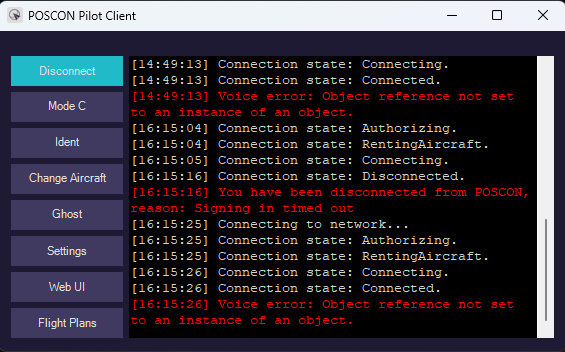
i have this error in pilot client [12:18:09] POSCON Pilot Client version 1.0.4 [12:18:09] Checking for changes to installed models... [12:18:09] No changes found. [12:18:09] Connected to simulator: KittyHawk (11.0.282174.999) [12:18:09] Custom model matching rules loaded. [12:26:43] Connecting to network... [12:26:43] Connection state: Authorizing. [12:26:44] Connection state: RentingAircraft. [12:26:44] Connection state: Connecting. [12:26:54] Connection state: Disconnected. [12:26:54] You have been disconnected from POSCON, reason: Signing in timed out [12:27:21] Connecting to network... [12:27:21] Connection state: Authorizing. [12:27:22] Connection state: RentingAircraft. [12:27:22] Connection state: Connecting. [12:27:22] Connection state: Connected. [12:27:33] Voice error: Connection has been shutdown by transport. Error Code: 0x80410005 [14:35:01] Connection state: Disconnected. [14:35:01] Disconnected from network. [14:49:12] Connecting to network... [14:49:12] Connection state: Authorizing. [14:49:12] Connection state: RentingAircraft. [14:49:13] Connection state: Connecting. [14:49:13] Connection state: Connected. [14:49:13] Voice error: Object reference not set to an instance of an object. [16:15:04] Connection state: Authorizing. [16:15:04] Connection state: RentingAircraft. [16:15:05] Connection state: Connecting. [16:15:16] Connection state: Disconnected. [16:15:16] You have been disconnected from POSCON, reason: Signing in timed out [16:15:25] Connecting to network... [16:15:25] Connection state: Authorizing. [16:15:25] Connection state: RentingAircraft. [16:15:26] Connection state: Connecting. [16:15:26] Connection state: Connected. [16:15:26] Voice error: Object reference not set to an instance of an object.
-
Pilot Client frequently disconnects [17:23:40] POSCON Pilot Client version 1.0.4 [17:23:40] Checking for changes to installed models... [17:23:40] No changes found. [17:23:40] Connected to simulator: KittyHawk (11.0.282174.999) [17:23:40] Custom model matching rules loaded. [17:23:42] Connecting to network... [17:23:42] Connection state: Authorizing. [17:23:43] Connection state: RentingAircraft. [17:23:44] Connection state: Connecting. [17:23:44] Connection state: Connected. [17:23:55] Voice error: Connection has been shutdown by transport. Error Code: 0x80410005 [17:33:31] Connection state: Authorizing. [17:33:32] Connection state: RentingAircraft. [17:33:32] Connection state: Connecting. [17:33:43] Connection state: Disconnected. [17:33:43] You have been disconnected from POSCON, reason: Signing in timed out [17:33:52] Connecting to network... [17:33:52] Connection state: Authorizing. [17:33:52] Connection state: RentingAircraft. [17:33:53] Connection state: Connecting. [17:33:55] Connection state: Connected. [17:33:55] Voice error: Object reference not set to an instance of an object. [18:05:02] Connection state: Authorizing. [18:05:02] Connection state: RentingAircraft. [18:05:03] Connection state: Connecting. [18:05:12] Connection state: Connected. [18:05:12] Voice error: Object reference not set to an instance of an object. [18:06:34] Connection state: Authorizing. [18:06:35] Connection state: RentingAircraft. [18:06:36] Connection state: Connecting. [18:06:46] Connection state: Disconnected. [18:06:46] You have been disconnected from POSCON, reason: Signing in timed out [18:06:56] Connecting to network... [18:06:56] Connection state: Authorizing. [18:06:57] Connection state: RentingAircraft. [18:06:57] Connection state: Connecting. [18:06:57] Connection state: Connected. [18:06:58] Voice error: Object reference not set to an instance of an object. [18:14:21] Connection state: Authorizing. [18:14:22] Connection state: RentingAircraft. [18:14:22] Connection state: Connecting. [18:14:33] Connection state: Disconnected. [18:14:33] You have been disconnected from POSCON, reason: Signing in timed out [18:14:36] Connecting to network... [18:14:36] Connection state: Authorizing. [18:14:37] Connection state: RentingAircraft. [18:14:37] Connection state: Connecting. [18:14:47] Connection state: Disconnected. [18:14:47] You have been disconnected from POSCON, reason: Signing in timed out [18:15:31] Connecting to network... [18:15:31] Connection state: Authorizing. [18:15:32] Connection state: RentingAircraft. [18:15:32] Connection state: Connecting. [18:15:32] Connection state: Connected. [18:15:32] Voice error: Object reference not set to an instance of an object. Pilot Client disconnects frequently What can I do?
-
I fixed it by installing .NET 6.0 SDK (v6.0.403) - Windows x86
-
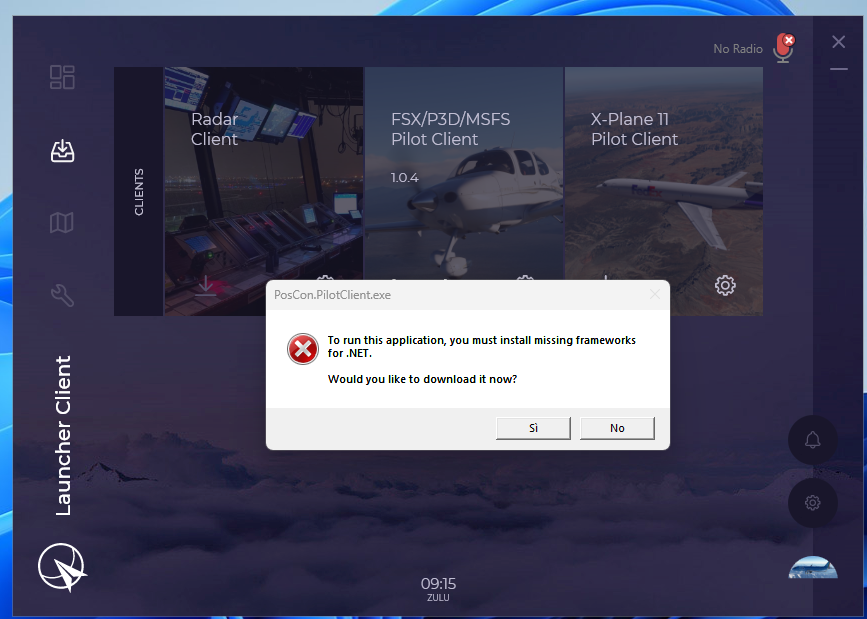
Hello, when I start the pilot client a window appears with the following message: To run this application, you must install missing frameworks for .NET. Would you like to download it now? I click on yes but the client does not start. I started the windovs feature activation to see if the frameworks are active and it turned out to be activated. I don't know how to start the pilot client anymore. thank you.
-
Hi. My name is Filippo Riili and I am a newbie to POSCON,I try to connect to msfs 2020 and receive the following message: you are now in ghost mode, reason, not yet completed welcome CBT. Can you tell me where it is completed? and how I connect in unghost. Thank you
-
Thank you very much
-
Unable to send FPL . Yhe new airline ITA AIRWAYS is not in the airline list
