


About This Club
This club was created to recruit members to the POSCON United Arab Emirates Division.
What's new in this club
-
 Adam M. (1016369) joined the club
 -
 Rasmus 1032946 joined the club
 -
 Rishabh Ratnalikar joined the club
 -
 Bahaeddine 1031989 joined the club
 -
 Mohamed 1032693 joined the club
 -
 Guest posted a topic in United Arab Emirates Division's General Discussion@Maher Abaza Hello, I’m already an ATC on VATSIM and IVAO, how can I became an ATC in OMDB also here on POSCON? Filippo,
 -
 Adil 1026838 joined the club
 -
 Joshua Jose 1023800 joined the club
 -
 Amal M M joined the club
 -
 Praveen 1026653 joined the club
 -
 Kenneth 1026084 joined the club
 -
 Hello everyone, The UAE airspace is now officially ready for ATC operations! The facility data team have been working hard to getting OMAE FIR ready, and we are glad to announce more ATC sessions upcoming, keep your eyes on the calendar!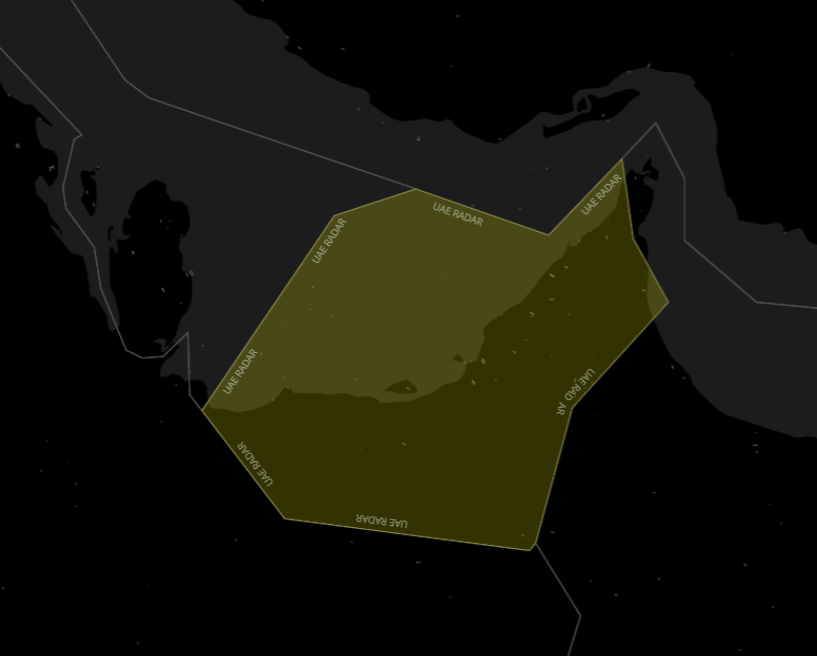
-
 Debmalya S. (1018583) joined the club
 -
 Arturas (1020887) joined the club
 -
 Sanjeevan (1021049) joined the club
 -
 Rayan Javed joined the club
 -
Maher Abaza replied to Lukas Svaton (1012163)'s topic in United Arab Emirates Division's General DiscussionThis week we are going to the United Arab Emirates, and we will conduct our VFR session at Dubai Intl. [OMDB]. Overview Dubai International Airport [OMDB] is the primary international airport serving Dubai, United Arab Emirates, and is the world's busiest airport by international passenger traffic. It is also the fifth-busiest airport in the world by passenger traffic, the sixth-busiest cargo airport in the world, the busiest airport for Airbus A380 and Boeing 777 movements, and the airport with the highest average number of passengers per flight. Emphasis Items Due to the nature of the airspace surrounding the airport, being situated next to 3 other airports (Sharjah Intl, Al-Maktoum Intl, and Al-Minhad AB), the VFR standard operating procedures are very specific and strict. It is mandatory to operate within the declared VFR Routes in the U.A.E AIP. Tower is equipped with a radar, and most likely is going to issue a unique transponder code to all VFR and IFR flights. Traffic aiming to conduct VFR circuits will be given taxi to the southern runway (12R/30L) and will remain south of the airfield at all times, maintaining 1,000 ft. AMSL. VFR traffic leaving the Dubai Control Zone will need a clearance via a VR (VFR Route). Refer to the UAE AIP Chart to familiarize yourself with the VFR Routes and Visual Reporting Points. Extra: Dubai CTA VFR Routes Dubai CTA Visual Reporting Points Although this group flight is for VFR operations, IFR departures will be controlled and will need to comply with published SIDs. Communication ATIS: 131.700 Dubai Tower: 118.750 Emergency (Guard): 121.500
-
 Luca (1022532) joined the club
 -
 Arman (1021600) joined the club
 -
Maher Abaza joined the club
-
 Matt Torti (1017668) joined the club
 -
 Steven (1021769) joined the club
 -
 Liam P. (1018646) joined the club
 -
 Salman M. joined the club
 -
 John K. (1019523) joined the club
 -
 Yaseen Izwayyed (1018638) joined the club
 -
 Mark F. joined the club
 -
 Agha Furqan S. joined the club
 -
 Darryn Soans (1017627) joined the club
 -
 Muhammad Abdullah joined the club
 -
 Laith Almetwali joined the club
 -
 Connor B. joined the club
 -
 michael l. (1013913) joined the club
 -
 Benjamin C Krebs joined the club
 -
 Dillon P. (1016752) joined the club
 -
 Peter S. (1013631) joined the club
 -
 Chandan Bhat joined the club
 -
 Sayed Z. (1016479) joined the club
 -
 Syam joined the club
 -
 Meesam R. (1012787) joined the club
 -
 Donat M. joined the club
 -
 Tom Bews joined the club
 -
 Sachin G. (1014898) joined the club
 -
 Andreas Paul joined the club
 -
 James D. (1012831) joined the club
 -
 Mohammad B. joined the club
 -
 HarrySindle joined the club
 -
 Mattia Rinaldi joined the club
 -
 Tom Sanderson joined the club
 -
 mina_elias joined the club
 -
 Karan K. (1012847) joined the club
 -
 Mahmoud F. (1000003) joined the club
 -
 Orpheas Panayiotopoulos joined the club
 -

-
 Hello and welcome to everyone interested in the United Arab Emirates Division of POSCON! I have created this forum to explore the possibility of releasing a division for United Arab Emirates during beta testing. The only way we will release with this division is if enough people show interest, so get all your friends to join this club and make sure that they stay active! If there is enough interest and discussion, we will devote our resources to creating the necessary infrastructure. We are going to need your help though with sector file construction and writing procedures! If you have any interest in helping us write this material, please email [email protected] مرحبا ومرحبا بكم في جميع المهتمين في قسم الإمارات العربية المتحدة من بوسكون! لقد أنشأت هذا المنتدى لاستكشاف إمكانية الإفراج عن تقسيم لدولة الإمارات العربية المتحدة خلال اختبار بيتا. الطريقة الوحيدة التي سوف نطلق سراح مع هذا التقسيم هو إذا ما يكفي من الناس تظهر الفائدة، حتى الحصول على جميع أصدقائك للانضمام إلى هذا النادي والتأكد من أن تبقى نشطة! إذا كان هناك ما يكفي من الاهتمام والمناقشة، وسوف نكرس مواردنا لإنشاء البنية التحتية اللازمة. نحن بحاجة إلى مساعدتكم على الرغم من مع بناء ملف القطاع والكتابة الإجراءات! إذا كان لديك أي مصلحة في مساعدتنا في كتابة هذه المواد، يرجى البريد الالكتروني [email protected]
