

Juvenal 1025243
Controllers
-
Joined
-
Last visited
Everything posted by Juvenal 1025243
-
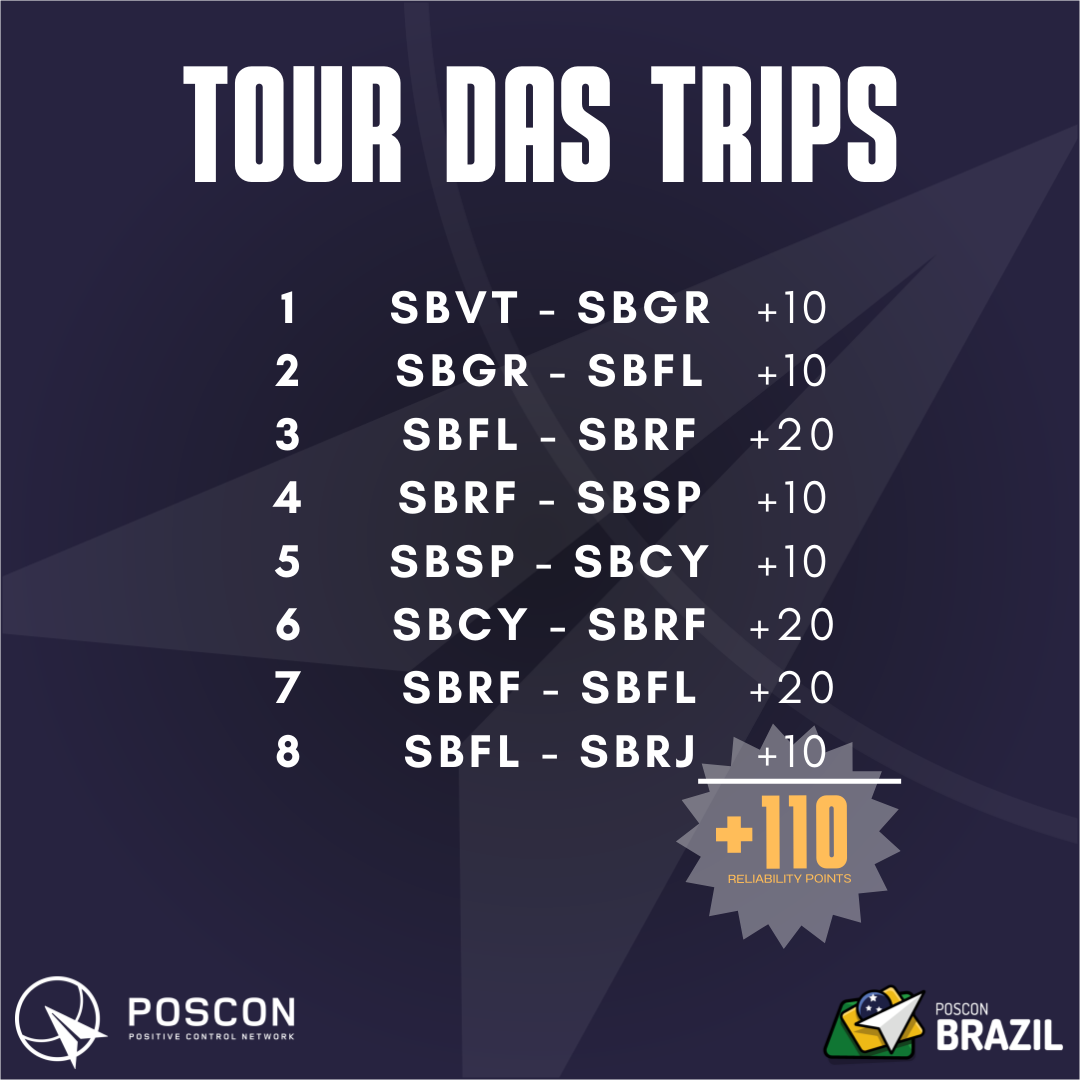
 Fala, pessoal! Depois de uma sugestão maravilhosa do @Tiago 1026060, criamos a TOUR DAS TRIPS. Nada mais é do que uma sugestão de tour envolvendo as TRIPS do mês corrente. Assim sendo, todo mês o Tour será reiniciado! E essas são as legs do TOUR DE JUNHO! Até mês que veeeem! ? Se você tem alguma dúvida de como funciona o sistema TRIPS, acesse: Trips System - POSCON Postagem no IG sobre o as TRIPS de JUNHO: Poscon Brazil (@posconbrazil) • Fotos e vídeos do Instagram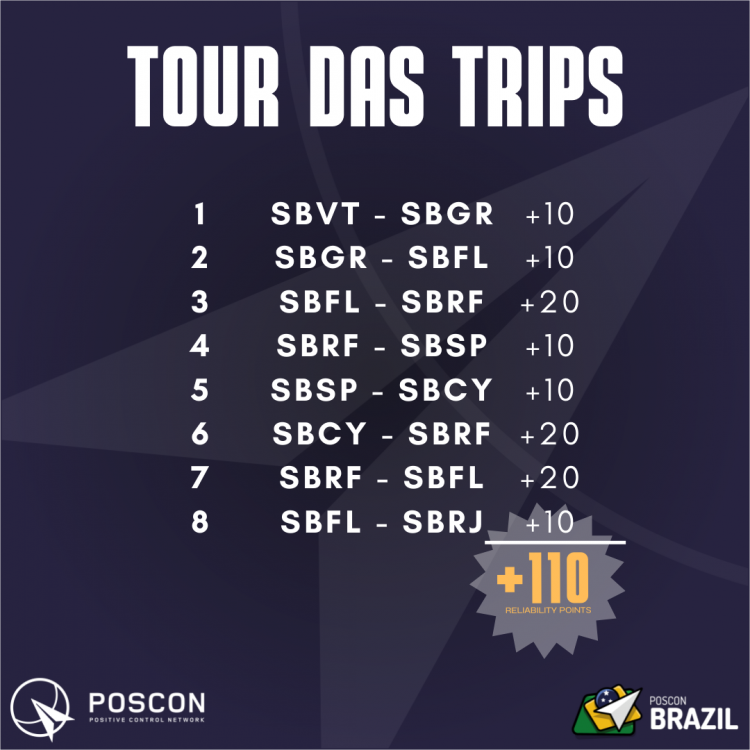
-
until
Sector: SBBS.SBBS.SBBS.BS1Booking for SBBS.SBBS.SBBS.BS1 created on the POSCON HQ. -
until
Sector: SBBS.SBBS.SBBS.BS1Booking for SBBS.SBBS.SBBS.BS1 created on the POSCON HQ. -
until
Sector: SBBS.SBBS.SBBS.BS1Booking for SBBS.SBBS.SBBS.BS1 created on the POSCON HQ. -
until
Booking for SBAZ.SBAZ.SBAZ.AZ1 created on the POSCON HQ. -
until
Sector: SBAZ.SBAZ.SBAZ.AZ1Booking for SBAZ.SBAZ.SBAZ.AZ1 created on the POSCON HQ. -
until
Sector: SBAZ.SBAZ.SBAZ.AZ1Booking for SBAZ.SBAZ.SBAZ.AZ1 created on the POSCON HQ. -
-
until
Sector: SBAZ.SBAZ.SBAZ.AZ1testing -
until
Booking for SBCW.SBCW.SBCW.CW1 created on the POSCON HQ. -
until
Sector: SBCW.SBCW.SBCW.CW1Booking for SBCW.SBCW.SBCW.CW1 created on the POSCON HQ. -
until
Sector: SBBS.SBBS.SBBS.BS1Booking for SBBS.SBBS.SBBS.BS1 created on the POSCON HQ. -
-
until
Sector: SBRE.SBFN.SBFN.FN4Booking for SBRE.SBFN.SBFN.FN4 created on the POSCON HQ. -
until
Sector: SBCW.SBCW.SBCW.CW1Booking for SBCW.SBCW.SBCW.CW1 created on the POSCON HQ. -
until
Sector: SBRE.SBRE.SBRE.RE1Booking for SBRE.SBRE.SBRE.RE1 created on the POSCON HQ. -
# Date Description Author - 18ABR22 Criação do documento Juvenal Gomes (1025243)
-
Use ever the AISWEB to check the active NOTAM. NOTE: What must prevail ever is common sense. If the pilot asks not to simulate a NOTAM, and this won't disturb other simmers, this request MUST BE attended! Punctual issues must be reported to our staff team.
-
Coordination with the APP WF Ever that the traffic is flying on SBRF traffic pattern, and the WF APP is online, the 360º maneuvering on the downwind leg or extending the downwind leg must be coordinated with APP. Restrictions on Traffic Pattern Normally, the ARRIVALS to the traffic pattern will be done by the following positions: Cais de Santa Rita; Lagoa Azul; or other position previously coordinated between APP and TWR The DEPARTURES will obey what is contained in this chapter, in VFR DEPARTURES.
-
ICAO Name ATC Facilities SSR Type of Operation SBRF Guararapes - Gilberto Freyre TWR / GND / DEL 0201-0210 VFR / IFR Purpose This document describes th e procedures that must be followed by the Air Traffic Service (ATS) at Guararapes Airport. The procedures described here are supplementary to the DECEA procedures. Scope Those procedures must be followed and applied by all members that are operating at SBRF. Especially the ATC, but not exclusive. Procedural deviations Exceptional situations, or unusual ones, can necessitate procedural deviations, or complementary procedures, to be added to the following procedures described in this document.
until
Booking for SBCW.SBCW.SBCW.CW1 created on the POSCON HQ.
until
Sector: SBBS.SBBS.SBBS.BS1Booking for SBBS.SBBS.SBBS.BS1 created on the POSCON HQ.
# Data Descrição Autor - 15ABR22 Criação do documento Juvenal Gomes (1025243)
Utilize sempre o AISWEB para consular os NOTAM vigentes. NOTA: O que deve prevalecer sempre é o bom senso. Caso o piloto solicite a não simulação de um NOTAM, e isso não atrapalhe a simulação dos demais, tal solicitação DEVE ser atendida. Problemas pontuais devem ser reportados ao nosso time de staff.
Important Information
By using this site, you agree to our Terms of Use, Privacy Policy, and Guidelines.